Chatbot Commands & Documentation
How the TeamVis chatbot converts times in messages and answers commands in Slack and Microsoft Teams.
Auto Time Conversion
How It Works
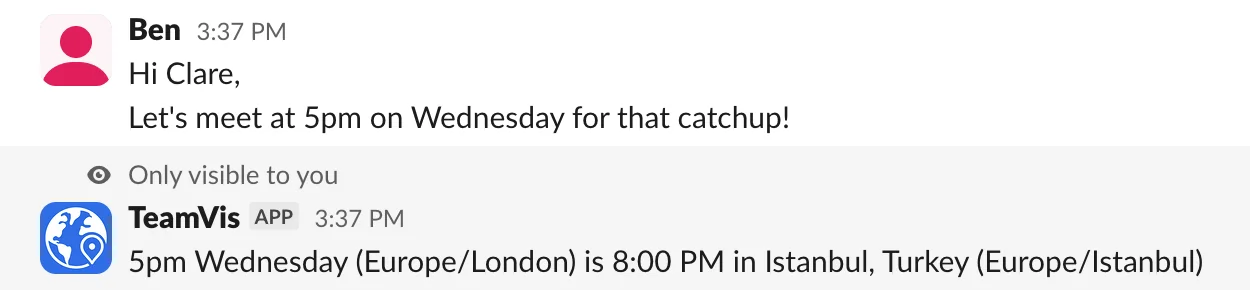
The bot looks for times mentioned in messages. When it finds one, it sends a private message to each person in a different time zone from the sender, with the time converted to their local time.
The bot must be added to the channel for this feature to work. You can add it using the command /invite @teamvis or by following the instructions here.
Message
{time} optionally prefixed or appended with {date_keyword} and/or {timezone_abbrev}Response
{original_time}({source_timezone}) is {converted_time} in {city}, {country} ({target_timezone}){original_time} ({source_timezone}) is {converted_time} locally ({target_timezone})Sent as a thread reply that only each person in a different time zone from the sender can see.
Example:
Supported Time Formats
12-hour format:
2:30pm or 2:30 PM — with minutes9am or 9 AM — without minutes24-hour format:
14:30 — hours:minutes (00-23)09:15 — leading zeros optionalSupported Date Keywords
todaytomorrownext weekmondaytuesdaywednesdaythursdayfridaysaturdaysundayKeywords are detected within 50 characters before the time mentioned.
Supported Time Zone Abbreviations
Add a time zone abbreviation after the time to set its time zone. Without one, the time is read in the sender's time zone.
North America:
EST / EDTPST / PDTCST / CDTMST / MDTAST / HSTEurope/UTC:
GMT / UTCCET / CESTEET / EESTWET / BSTAsia/Pacific:
JST / KSTIST / SGTAEST / AEDTNZST / HKTCommand-Based Features
/workinghours
See a teammate's working hours in your time zone, with a heads-up about upcoming holidays and clock changes.
Pattern:
/workinghours @userResponse:
{user_name} works {days} {start_time} – {end_time} your time{start_time} – {end_time} in {their_location}){n} days away until next national holiday ⚠️ No national holidays found for {location}⚠️ No location set{n} days until next daylight savings time shift for {timezone}⏰ No daylight savings time shifts for {timezone}/overlap
Find the working hours two or more teammates share.
Pattern (multiple users):
/overlap @user1 @user2 @user3...Pattern (you + one user):
/overlap @userResponse format (you + one user):
{user_name} today is {hours} hours ({start}-{end} your time){your_start}-{your_end}{user_name}:{their_start}-{their_end}{their_start_converted}-{their_end_converted}Response format (multiple users):
{user1} and {user2} is {hours} hours ({start}-{end} your time){user_name}:{their_start}-{their_end}{their_start_converted}-{their_end_converted}{overlap_start_in_their_tz}-{overlap_end_in_their_tz} ({overlap_start_in_your_tz}-{overlap_end_in_your_tz} in {their_location})/location
See a teammate's current location, time zone and local time.
Pattern:
/location @userResponse:
{user_name}{city}, {country}(or {timezone} if no city/country set){timezone}{local_time}